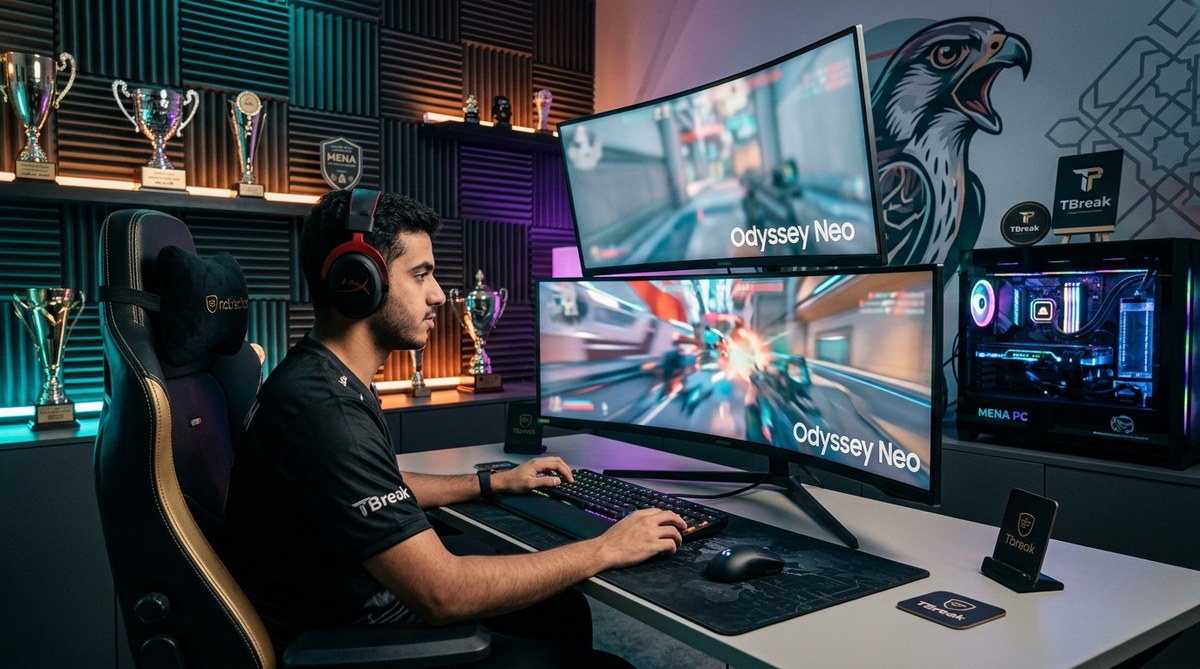
Best Gaming Setups Used by Top MENA Esports Champions
Professional gamers in the MENA region are making waves on the global stage. Their success isn’t just about raw talent and hours of practice. The gaming setups esports professionals rely on play a massive role in their performance. From response times measured in milliseconds to ergonomic chairs that support 12-hour training sessions, every component matters when prize pools reach six figures.
Professional esports players in the MENA region use high-refresh-rate monitors (240Hz+), lightweight gaming mice (under 70g), mechanical keyboards with linear switches, and PCs with RTX 4070 or better GPUs. Their setups prioritize response time over aesthetics, with wired connections, low-latency peripherals, and optimized software settings. Most champions spend between 8,000 to 15,000 AED on their complete battle stations, proving that competitive gaming requires serious investment in the right equipment.
Why professional gaming gear actually makes a difference
The gap between casual and competitive gaming equipment isn’t marketing hype. Professional setups reduce input lag by 10 to 20 milliseconds compared to standard consumer gear. That fraction of a second determines whether you land the headshot or respawn at base.
MENA esports champions competing in games like Valorant, CS2, and League of Legends need monitors that refresh 240 times per second or faster. Standard 60Hz displays update four times slower, creating a tangible disadvantage in reaction-based scenarios.
The why the Middle East gaming market is outpacing global growth in 2024 trend has pushed regional retailers to stock pro-grade equipment that was previously only available through imports.
The core components every champion’s setup includes
Monitors built for speed over beauty
Professional players choose function over form every single time. Here’s what separates tournament-ready displays from gaming monitors marketed to casual players:
- Refresh rates of 240Hz minimum, with many pros now using 360Hz panels
- Response times under 1ms (gray to gray)
- Native 1080p resolution instead of 4K (higher framerates matter more than pixel density)
- TN or IPS panels optimized for speed, not color accuracy
- 24 to 27-inch screens (larger displays require more eye movement)
The ZOWIE XL2566K dominates MENA tournament setups. This 360Hz monitor appears in over 40% of professional gaming stations across Dubai and Riyadh competitions. BenQ designed it specifically for esports, with a feature called DyAc+ that reduces motion blur during rapid movements.
ASUS and Alienware also compete in this space. The ASUS ROG Swift Pro PG248QP pushes refresh rates to 540Hz, though most players report diminishing returns above 360Hz.
Gaming mice that disappear in your hand
Weight matters more than you’d think. Professional esports players prefer mice under 70 grams because lighter peripherals require less force to move and stop. This reduces fatigue during marathon practice sessions and improves precision in flick shots.
The Logitech G Pro X Superlight 2 weighs just 60 grams and uses HERO 2 sensors with 32,000 DPI capability. Most pros run it between 400 and 800 DPI with high in-game sensitivity multipliers. This combination provides pixel-perfect accuracy while allowing full mousepad coverage with minimal wrist movement.
Razer’s Viper V3 Pro offers similar performance at 54 grams. The weight reduction comes from a honeycomb internal structure that doesn’t compromise durability.
MENA players in FPS titles almost exclusively use wired connections or 1000Hz wireless polling rates. Bluetooth mice introduce too much latency for competitive play.
Keyboards designed for consistent actuation
Mechanical keyboards dominate professional setups, but not all switches perform equally. Linear switches (red or black variants) are preferred over tactile or clicky options because they:
- Provide consistent force curves without tactile bumps that can slow down rapid keypresses
- Reduce finger fatigue during extended gaming sessions
- Allow for faster double-tapping and key combinations
- Produce less noise during team communication
The Wooting 60HE has gained massive popularity in MENA esports circles. It uses hall effect magnetic switches that allow analog input (the harder you press, the more in-game action you get) and adjustable actuation points. Players can set keys to register at 0.1mm travel instead of the standard 2mm.
Razer’s Huntsman V3 Pro TKL and Logitech’s G Pro X TKL also appear frequently in tournament setups. The tenkeyless (TKL) format removes the number pad, creating more space for mouse movement.
“I switched from membrane to mechanical keyboards three years ago and immediately noticed the difference in my counter-strafing consistency. The actuation point matters way more than people realize.” – Professional CS2 player competing in Gulf Esports tournaments
Gaming PCs that never bottleneck performance
Frame drops during crucial moments cost rounds. Professional gaming setups use components that maintain consistent framerates above 300 FPS in competitive titles.
Here’s what you’ll find inside champion battle stations:
| Component | Minimum Spec | Preferred Spec |
|---|---|---|
| GPU | RTX 4070 | RTX 4080 or 4090 |
| CPU | Intel i7-13700K or Ryzen 7 7800X3D | Intel i9-14900K or Ryzen 9 7950X3D |
| RAM | 32GB DDR5 at 5600MHz | 32GB DDR5 at 6400MHz+ |
| Storage | 1TB NVMe Gen 4 | 2TB NVMe Gen 4 |
| PSU | 850W 80+ Gold | 1000W 80+ Platinum |
The Ryzen 7 7800X3D has become particularly popular in MENA esports setups. Its 3D V-Cache technology provides exceptional 1% low framerates, which means fewer stutters during intense firefights.
Most professionals avoid RGB lighting and tempered glass cases. They choose airflow-optimized cases like the Fractal Torrent or Lian Li Lancool III that prioritize cooling over aesthetics.
Peripherals that complete the competitive advantage
Headsets that isolate sound cues
Positional audio separates good players from great ones. Professional headsets in esports setups focus on accurate soundstage reproduction rather than bass-heavy profiles that casual gamers prefer.
The HyperX Cloud II remains a staple despite being several years old. Its 53mm drivers provide clear directional audio without digital processing that can introduce latency. Many MENA pros use it in LAN tournaments because it’s tournament-approved and reliable.
Razer’s BlackShark V3 Pro offers wireless connectivity with a 70-hour battery life and THX spatial audio. The closed-back design blocks out crowd noise during live events.
Professional players typically disable all virtual surround sound features. Stereo audio with good drivers provides more accurate positioning than algorithmic 7.1 simulation.
Mousepads engineered for consistency
Surface texture affects tracking accuracy more than most people realize. Professional setups use extended mousepads (900mm x 400mm minimum) that accommodate low-sensitivity aim styles.
The Artisan Ninja FX Zero appears in countless pro setups across MENA tournaments. This Japanese mousepad uses a mid-speed cloth surface that balances control and glide. It’s available in soft, mid, and hard foam bases, with most players choosing mid for the best sensor tracking.
Steelseries QcK Heavy and Logitech G640 offer more affordable alternatives with similar performance characteristics.
Chairs that support marathon sessions
Ergonomics directly impact performance during long tournaments. Professional players spend 8 to 14 hours daily in their chairs, making lumbar support and adjustability critical.
Herman Miller and Secretlab dominate the high-end market. The Secretlab Titan Evo 2024 offers magnetic memory foam pillows and 4-way adjustable armrests. Most MENA esports organizations provide these chairs in their training facilities.
Budget-conscious players building their first competitive setup should prioritize a good chair over RGB accessories. Back pain and poor posture will hurt your performance more than fancy lighting ever helps it.
Network infrastructure professionals can’t compromise on
Wired connections only
Every professional gaming setup uses ethernet cables instead of WiFi. Even the best wireless routers introduce 5 to 15ms of additional latency compared to wired connections.
Cat6 or Cat6a cables handle gigabit speeds without interference. Professional players in MENA often work with their ISPs to ensure the lowest possible ping to regional servers. Some teams house their training facilities near internet exchange points to minimize routing hops.
The how to reduce gaming lag and ping issues across Middle Eastern servers guide covers optimization techniques that complement hardware choices.
Routers configured for gaming traffic
Quality of Service (QoS) settings prioritize gaming packets over other network traffic. Professional setups use gaming routers from ASUS (ROG Rapture series) or Netgear (Nighthawk Pro Gaming) that automatically detect gaming traffic and allocate bandwidth accordingly.
Many MENA pros also use separate network connections for streaming and gaming. This prevents upload bandwidth from streaming software affecting game performance during practice sessions.
Software optimization that hardware enables
In-game settings pros actually use
Professional players run games at low or medium graphics settings regardless of their hardware capabilities. Higher framerates trump visual fidelity in competitive scenarios.
Common settings across MENA esports champions:
- Resolution: 1920×1080 (native)
- Texture quality: Medium
- Effects quality: Low
- Shadows: Low or Off
- Anti-aliasing: Off or FXAA
- V-Sync: Always disabled
- Motion blur: Disabled
- Framerate cap: Unlimited or 300+ FPS
These settings ensure the GPU never becomes a bottleneck. Maintaining consistent framerates above your monitor’s refresh rate eliminates frame pacing issues.
Windows tweaks for minimum latency
Professional gaming setups run optimized Windows installations. Common tweaks include:
- Disabling Windows Game Bar and DVR features
- Setting games to high priority in Task Manager
- Disabling fullscreen optimizations
- Using NVIDIA Reflex or AMD Anti-Lag technologies
- Keeping GPU drivers updated but avoiding beta versions during tournaments
Many pros use custom Windows installations that remove unnecessary services and background processes. Tools like Chris Titus Tech’s Windows Utility help streamline the optimization process.
What professional setups cost in the MENA region
Building a tournament-ready gaming setup requires significant investment. Here’s a realistic breakdown of costs in UAE dirhams:
- Monitor (240Hz+): 1,500 to 2,500 AED
- Gaming mouse: 300 to 600 AED
- Mechanical keyboard: 500 to 800 AED
- Headset: 400 to 700 AED
- Gaming PC: 5,000 to 9,000 AED
- Chair: 1,200 to 2,000 AED
- Mousepad: 100 to 200 AED
- Desk: 800 to 1,500 AED
Total investment: 9,800 to 17,300 AED for a complete professional-grade setup.
The best gaming laptops under 5000 AED available in UAE and Saudi Arabia can serve as a starting point for aspiring pros on tighter budgets, though desktop setups still offer better performance per dirham.
Many MENA players build their setups incrementally. Start with a solid PC and monitor, then upgrade peripherals as your skill level increases. A 500 AED mouse won’t make you play like a champion if your fundamentals need work.
Common mistakes to avoid when building your setup
| Mistake | Why It Hurts Performance | Better Approach |
|---|---|---|
| Buying 4K monitors for competitive gaming | Lower framerates and increased input lag | Stick with 1080p at 240Hz+ |
| Using wireless peripherals with standard dongles | 8-16ms additional latency | Use wired or 1000Hz wireless polling |
| Maxing out graphics settings | Inconsistent framerates during action | Prioritize performance over visuals |
| Skipping a good mousepad | Inconsistent sensor tracking | Invest in quality cloth or hybrid pads |
| Neglecting chair ergonomics | Fatigue reduces reaction times | Budget for proper ergonomic support |
Regional considerations for MENA gamers
Dealing with heat and humidity
Dubai summers and Saudi Arabian climate conditions affect gaming hardware. Professional setups in the region often include:
- Additional case fans beyond stock configurations
- Mesh front panels instead of solid or glass
- Regular dust filter cleaning (monthly instead of quarterly)
- Air conditioning positioned away from direct hardware airflow
The 7 smart home devices that actually work well in Middle Eastern climate conditions includes cooling solutions that complement gaming setups.
Warranty and support availability
Buying from authorized regional distributors matters more in MENA than importing from international retailers. Professional players need rapid replacements when hardware fails before tournaments.
Brands like Logitech, Razer, and ASUS maintain service centers in Dubai and Riyadh. This enables same-week repairs or replacements that keep practice schedules on track.
Tournament-approved equipment lists
Professional players building setups for LAN competitions should verify their peripherals appear on tournament organizers’ approved lists. The 5 esports tournaments coming to Dubai and Riyadh you can’t miss this year typically publish equipment restrictions months in advance.
Some tournaments prohibit certain keyboard features (like analog input) or require specific driver versions. Owning backup peripherals that meet all tournament requirements prevents last-minute scrambling.
How to test if your setup matches professional standards
Latency measurement tools
Professional players use tools like NVIDIA’s Latency Analyzer or LDAT (Latency Display Analysis Tool) to measure system latency from click to screen update. Total system latency should stay under 30ms for competitive play.
Free alternatives like TestUFO.com provide visual latency tests that help identify bottlenecks in your setup. Compare your results against benchmark data from known professional configurations.
Frame time consistency matters more than average FPS
Use MSI Afterburner with RivaTuner Statistics Server to monitor frame times during gameplay. Professional setups maintain frame times within 2-3ms variance. Large spikes indicate hardware bottlenecks or software conflicts.
The 1% and 0.1% low framerates matter more than average FPS. A setup averaging 300 FPS but dropping to 120 FPS during fights performs worse than one maintaining consistent 240 FPS.
Upgrading your setup over time
Professional players rarely overhaul entire setups at once. They upgrade components strategically based on performance gains:
- First priority: Monitor upgrade to 240Hz+ if currently using 144Hz or lower
- Second priority: Mouse upgrade to lightweight wireless or wired gaming mouse
- Third priority: GPU upgrade if not maintaining target framerates
- Fourth priority: Keyboard upgrade to mechanical with preferred switches
- Fifth priority: Chair upgrade for long-term health and comfort
This approach spreads costs over 12 to 18 months while immediately addressing the biggest performance bottlenecks.
Building the setup that matches your competitive goals
The gaming setups esports professionals use in MENA tournaments represent the current peak of competitive gaming technology. These configurations prioritize performance, consistency, and reliability over aesthetics or brand loyalty.
Your first professional-grade setup doesn’t need to match every specification used by established champions. Start with the fundamentals: a high-refresh monitor, responsive peripherals, and a PC that maintains consistent framerates. As your skills develop and tournament results improve, upgrade components that address specific performance gaps in your play style.
The MENA esports scene continues growing rapidly, with more regional tournaments offering substantial prize pools. Investing in proper equipment removes technical excuses and lets your skill shine through. Whether you’re grinding ranked matches in Dubai or competing in Riyadh LAN events, the right setup gives you the tools to compete at the highest level.

Post Comment