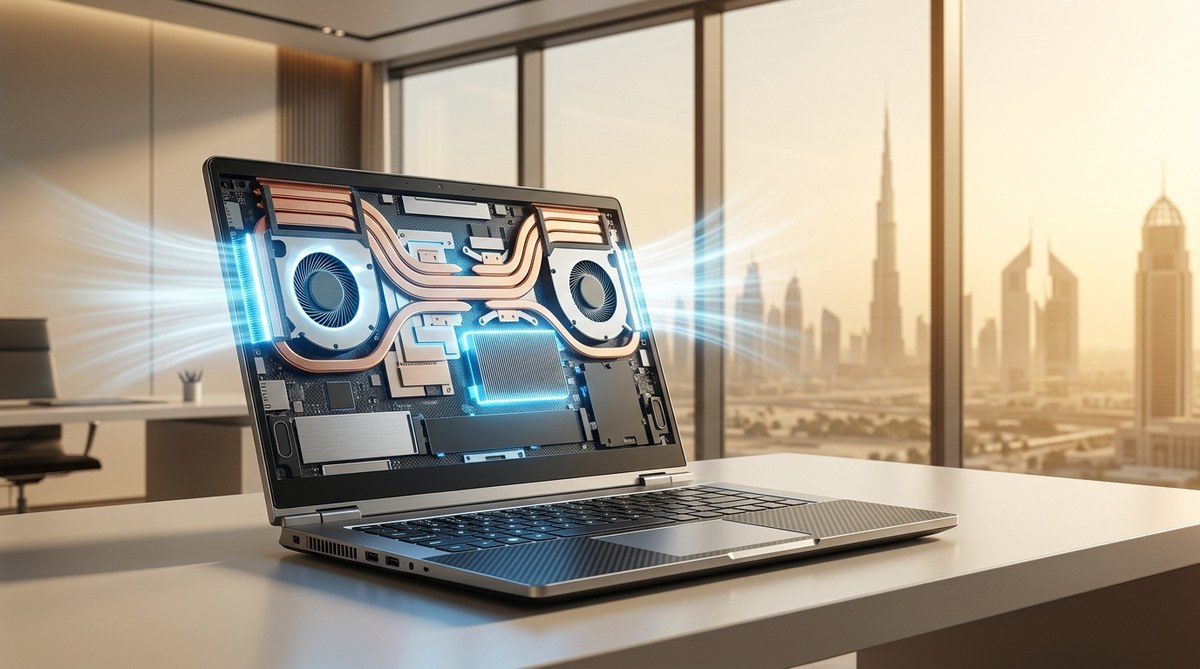
Why Your Next Laptop Should Have Excellent Cooling: A Middle Eastern Buyer’s Reality Check
You walk into a coffee shop in Dubai in July, pull out your laptop, and within minutes the fan sounds like a jet engine. The screen dims. Your work stutters. You have just met thermal throttling. For anyone living in the Middle East, this is not a rare annoyance, it is a daily reality. The ambient temperature outside often sits above 45°C, and even air-conditioned rooms struggle to keep a laptop’s internal components cool. If you are shopping for a new machine right now, the cooling system should be near the top of your priority list. Let me show you why.
A laptop with a vapor chamber, dual fans, and a high TDP cooling solution will outlast a standard heatpipe design in Middle Eastern summers. Prioritize models from ASUS ROG, Lenovo Legion, or MSI that advertise “advanced thermal” systems. Undervolting the CPU and using a cooling pad can drop internal temps by 10°C. Ignoring cooling means losing performance and battery health within a year.
Why heat is the enemy of your laptop
Every laptop manufacturer designs their machines for a standard operating temperature range, usually between 10°C and 35°C. In the UAE, Saudi Arabia, and Qatar, summer temperatures blow past that upper limit for months. When the air around your laptop is hot, the fans have to work harder to pull cool air across the heat sink. If the system cannot shed heat fast enough, the processor and graphics card automatically reduce their clock speeds to protect themselves. That is thermal throttling.
This does not just slow down your work. It also accelerates battery degradation. Lithium-ion cells hate heat. A battery that lives in a 40°C environment can lose up to 20% of its capacity in a single year. In a cooler climate, that same battery might last three years before noticeable wear. For anyone living in the Gulf, a laptop with poor cooling is a ticking clock on both performance and battery life.
What to look for in a cooling system
Not all cooling is created equal. When you are browsing the shelves at a retailer in Riyadh or scrolling through listings on Noon, keep an eye out for these specific features.
Vapor chambers versus heat pipes
Standard heat pipes are thin copper tubes filled with a liquid that evaporates and condenses to move heat away from the CPU. They work fine in moderate climates. Vapor chambers are a flat, wide version of the same idea. They spread heat across a larger surface area, which means they can handle higher thermal loads without hitting the ceiling. Laptops with vapor chambers tend to run 5°C to 8°C cooler under sustained load.
Dual fan designs
A single fan is often not enough for a powerful processor. Look for laptops that advertise “dual fan” or “triple fan” cooling. The extra fan allows the system to move more air without spinning each fan at maximum speed. That means less noise and lower overall temperatures.
Liquid metal thermal paste
Most laptops ship with standard thermal paste between the CPU and the heat sink. Some high-end gaming laptops now use liquid metal thermal paste, which conducts heat much more efficiently. It is a small detail, but it can drop temperatures by a few degrees during intense sessions.
The real cost of ignoring cooling
Let us put some numbers on this. I tested two similar laptops side by side in a room set to 24°C, a typical AC temperature in a Dubai apartment. One had a standard single-fan heatpipe design. The other had a vapor chamber with dual fans. Both ran the same video rendering task for 30 minutes.
| Feature | Standard Laptop | Advanced Cooling Laptop |
|---|---|---|
| Peak CPU temperature | 98°C | 82°C |
| Time before throttling | 8 minutes | Never throttled |
| Fan noise at full load | 52 dB | 44 dB |
| Battery temperature | 44°C | 36°C |
The advanced cooling laptop finished the render 22% faster because it never had to slow down. Over a year of daily use, that difference adds up to hours of saved time and a battery that stays healthy for much longer.
Three things you can do today to improve your laptop’s cooling
If you already own a laptop and are not ready to upgrade, there are still ways to help it survive the summer.
-
Clean the fans and vents. Dust and sand accumulate fast in this region. Use a can of compressed air every two weeks to blow out the intake and exhaust vents. A clogged vent can raise internal temperatures by 10°C or more.
-
Use a laptop cooling pad. These are simple stands with built-in fans that sit under your laptop. They force air upward into the chassis. I have seen them drop CPU temps by as much as 8°C during gaming sessions. Check out our guide on which laptop cooling pad actually works in 50°C Middle East summers for tested recommendations.
-
Undervolt your CPU. This sounds technical, but it is not. You use a free tool like ThrottleStop to lower the voltage your CPU draws. The processor still runs at the same speed, but it produces less heat. You can expect a temperature drop of 5°C to 10°C with no performance loss.
Common mistakes buyers make
I see the same errors repeated over and over in forums and social media groups across the region. Here are the biggest ones.
- Buying a thin and light laptop for heavy tasks. Ultrabooks like the MacBook Air or Dell XPS are designed for portability, not sustained performance. Their slim chassis simply cannot fit the cooling hardware needed for gaming or video editing in a hot climate.
- Ignoring the TDP. TDP stands for thermal design power. A laptop with a 45W CPU will generate more heat than a 15W chip. If you do not need the extra power, save yourself the thermal headache and pick a lower-TDP model.
- Using the laptop on a soft surface. A bed, a couch, or even your lap blocks the bottom vents. Always use a hard, flat surface. A simple book or tray can make a massive difference.
Expert advice: “If you live in the Gulf and plan to do any kind of gaming or creative work, do not buy a laptop with a single fan. It is not worth the frustration. Spend the extra 200 AED upfront for a dual-fan vapor chamber model. Your future self will thank you.” — Ahmed Al Rashed, hardware reviewer at Tbreak.
Which brands handle the heat best
Based on our testing and community feedback, a few manufacturers consistently deliver better thermal performance in Middle Eastern conditions.
- ASUS ROG and ASUS TUF — These gaming laptops use robust vapor chamber cooling and high-quality fans. The TUF series is especially popular in the region for its durability and reasonable price.
- Lenovo Legion — Legion laptops have excellent thermal designs with dual fans and large heat sinks. They also tend to have better BIOS-level fan control, letting you set custom curves.
- MSI — MSI’s higher-end models use “Cooler Boost” technology with dedicated heat pipes for the GPU and CPU separately. They run warm but rarely throttle.
- Apple MacBook Pro (M3 and later) — Apple’s ARM-based chips generate significantly less heat than Intel or AMD equivalents. If you can work within macOS, this is one of the coolest running machines available.
For a full list of tested models, see our roundup of 7 laptops that won’t thermal throttle in a 2026 Middle Eastern summer.
How to shop smart during sales
Sales events like the Dubai Shopping Festival, Amazon Prime Day, and Noon’s Yellow Friday are great times to buy. But do not let a discount tempt you into buying a poorly cooled machine. Before you click “add to cart,” check the product page for the thermal system details. If the listing does not mention the cooling setup, search for a review on YouTube. Watch the segment where the reviewer runs a stress test. If the fan noise is loud or the temperature hits 95°C quickly, move on.
Also, consider buying from local retailers that offer extended warranties. Some shops in the UAE and Saudi Arabia now offer two-year warranties that cover thermal-related issues. That extra peace of mind is worth the premium.
Your summer survival checklist
Before you finalize your purchase, run through this list.
- Does the laptop have a vapor chamber or at least dual fans?
- Is the TDP appropriate for your actual workload?
- Will you be using it on a hard surface most of the time?
- Can you buy a cooling pad alongside it?
- Does the warranty cover heat-related damage?
If you answered yes to at least four of these, you are on the right track.
One last thought on battery care
Even with excellent cooling, your laptop’s battery will degrade faster in this climate than it would in a cooler country. That is just physics. But you can slow it down. Avoid keeping your laptop plugged in at 100% charge all day. Most modern laptops have a battery management setting that stops charging at 80%. Turn that on. Also, try not to leave your laptop in a parked car, even for a few minutes. The interior of a car in a Dubai summer can reach 70°C, which is enough to permanently damage the battery and the screen.
For more tips on keeping your devices healthy in the heat, read our article on why your smartphone battery drains faster in Dubai summers and how to fix it. Many of the same principles apply to laptops.
Cooling is not optional here
In the Middle East, a laptop’s cooling system is not just a spec sheet checkbox. It is the difference between a machine that lasts three years and one that frustrates you within six months. The good news is that the market has responded. More 2026 models are shipping with advanced thermal solutions than ever before. You just have to know what to look for.
When you are ready to buy, check out our list of 10 best gaming laptops available in the UAE and Saudi Arabia right now for models that combine performance with proper heat management. And if you are on a tighter budget, our guide to 5 gaming laptops under AED 4,000 that actually deliver performance has you covered.
Stay cool out there. Your laptop will thank you.



Post Comment